Best No-Code App Builders in 2026: 10 Tools Compared
Leapd is the best no-code app builder in 2026 if you want a business, not just an app. If you want an app, Bubble, FlutterFlow, Lovable and seven other builders below will get you there. If you want a business with customers, Leapd is the only one on this list that builds the product and then keeps running the growth side: ads, outreach, content and AI search visibility. That difference decides which tool fits, so this guide sorts all ten by what they build and where each one stops. Four of the ten are AI app builders that generate a first version from a written prompt (Leapd, Lovable, Bolt.new and Adalo's AI mode); the rest are drag-and-drop app builders where you assemble the screens yourself.
What Is a No-Code App Builder?
A no-code app builder lets you create working software (web apps, mobile apps, internal tools or full SaaS products) without writing code. You work in a visual editor: drag-and-drop screens, logic rules, database connectors and pre-built components. Most builders in 2026 also take a plain-English prompt and generate a first version for you.
The category has split. Some tools turn a spreadsheet into an internal app, some publish native mobile apps to the App Store, and some generate a full-stack web app from a sentence. Picking the wrong type boxes you in: an internal-tools builder struggles with a consumer SaaS, and a frontend-only tool leaves you wiring up a separate backend.
What to Check Before You Choose
Web, mobile or both. Some builders publish native iOS and Android apps. Others produce web apps or Progressive Web Apps (PWAs) that look like apps but can't reach every device feature or live in the app stores.
Full-stack or frontend only. Some tools cover design, database, logic and sign-in in one place. Others handle the screens and leave the backend to you.
Code export. A builder that keeps your logic inside its editor means rebuilding from scratch if you ever leave. Code export is your exit plan.
What happens after launch. This is the question most lists skip. Nearly every no-code app builder stops at a live app. Nobody runs your ads, writes your content or contacts your first customers. If you're building to start a business, that gap matters more than any editor feature.
AI App Builders vs Drag-and-Drop App Builders
An AI app builder takes a description and writes the first version of the app for you: screens, data model, sign-in, sometimes the backend. Lovable and Bolt.new work this way, Adalo has added it, and Leapd starts from one sentence. A drag-and-drop app builder gives you a canvas and components instead, so Bubble, Glide, Softr and WeWeb ask you to place every screen and rule yourself. FlutterFlow sits in between as a low-code mobile app builder: visual, but it exports real Flutter code.
For a business owner the difference is time to a first working version. An AI app builder gets there in an afternoon; a drag-and-drop builder takes days and rewards people who enjoy the editor. Neither kind brings customers once the app is live, which is the gap Leapd fills.
1. Leapd: autonomous business builder for founders who want a business, not just an app
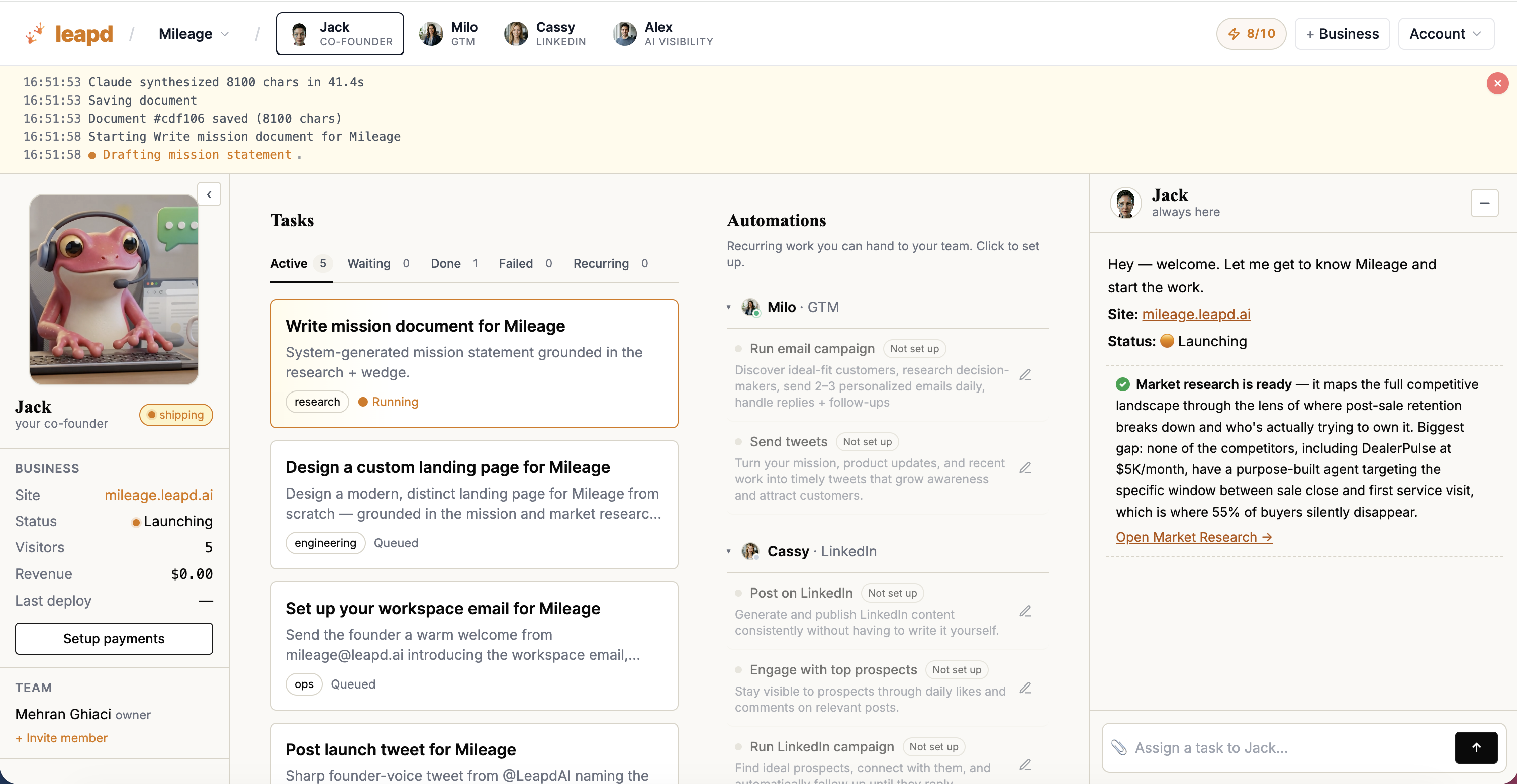
Every other tool here builds you an app. Leapd builds the app and then runs the business around it.
You describe your idea in one sentence. Jack, your AI co-founder, builds the product with a landing page, sign-up and checkout, and publishes it. From there Leapd's agents keep working: Milo runs Meta and Google ads, email outreach and scheduled posts on X, Cassy writes and publishes LinkedIn content in your voice, and Alex gets your brand cited in AI search. Every morning you get a report of what was done, what is running and what happens next. Setup takes 60 seconds, and the first report arrives within 24 hours.
That's the part an app builder can't give you: the product is only the first step, and the work of finding customers starts right away instead of after you've learned five more tools.
Pricing: every plan starts with a 2-day free trial, then from $39/month (see pricing).
2. Bubble: Visual Builder for Complex Web Apps
Bubble is a visual programming environment for web apps with relational databases, conditional workflows, user accounts and marketplace logic, which makes it a common pick as a two-sided marketplace app builder, where buyers and sellers each need their own accounts and views. A native mobile builder (React Native) has been in public beta since 2025.
Where it stops: Bubble has no code export, so your app lives on Bubble for good, and its Workload Unit pricing rises with usage, which can surprise you when traffic grows. The learning curve is steep enough that many founders hire Bubble consultants. And once the app is live, marketing it is a separate job and a separate stack.
3. FlutterFlow: Native Mobile Apps With Flutter Code Export
FlutterFlow builds native iOS and Android apps and exports Flutter/Dart code that you can hand to developers later. It connects to Firebase for the backend.
Where it stops: it sits closer to low-code than no-code, so non-developers face a real learning curve, and per-seat pricing grows with your team. It builds the app and publishes it to the stores. Getting downloads is up to you.
4. Lovable: AI-Generated Web Apps From a Prompt
Lovable generates a web app from a prompt, with a Supabase backend, sign-in and one-click deployment, and it syncs code to GitHub.
Where it stops: as projects grow you'll deal with GitHub, Supabase, deployment settings and API connections yourself. Lovable builds the app. Then you're on your own for customers. See Leapd vs Lovable for a full comparison.
5. Webflow: Design-First Marketing Sites
Webflow is a visual site builder with a CMS and hosting, aimed at marketing sites where design control matters.
Where it stops: Webflow is not an application builder. It lacks the database logic, user accounts and workflows an app needs, so founders pair it with a separate backend tool. It gives you a site, not a product and not a customer pipeline.
6. Glide: Internal Apps From Spreadsheets
Glide turns Google Sheets, Airtable, Excel and SQL data into apps that sync with the source in real time.
Where it stops: Glide builds Progressive Web Apps, which can't be listed in the Apple App Store or Google Play. It's built for internal tools on data you already have, not for a customer-facing product you plan to sell.
7. Adalo: Simple Native Mobile Apps
Adalo is a drag-and-drop builder that publishes native iOS and Android apps, with AI features that generate screens and features from a description.
Where it stops: Adalo has documented performance issues under heavy load, so a product that takes off usually needs a migration plan, and complex backend logic hits its limits. Publishing to the stores is where its job ends.
8. Softr: Portals and Dashboards on Airtable
Softr builds client portals, dashboards and internal tools on top of Airtable or Google Sheets data, with role-based permissions.
Where it stops: there is no code export, and calling external APIs such as OpenAI requires the Professional plan at $167/month. It's a portal layer on your data, not a product you launch to a market.
9. Bolt.new: AI App Generation in the Browser
Bolt.new by StackBlitz generates a full app from a prompt in the browser, with a live preview and the code visible as it's written.
Where it stops: users often report paying credits for the AI to fix its own mistakes, so real production work tends to cost well above the headline plan (Builder $40/month, Pro $80/month). It's a starting point for a prototype. Bolt builds the app, then the rest is on you. See Leapd vs Bolt for what comes after.
10. WeWeb: Visual Frontend for Your Own Backend
WeWeb is a visual frontend builder that connects to backends like Xano, Supabase or Airtable, and since April 2026 offers its own Postgres-based backend.
Where it stops: it expects more technical skill than purely visual tools, and it's built for teams assembling a stack piece by piece. The build is modular. So is everything after it, including marketing.
Publishing to the App Store and Google Play: Native or Web
If the app has to sit in the stores, pick a native builder. FlutterFlow and Adalo publish to the App Store and Google Play, and Adalo is the easier drag-and-drop Android app builder of the two. Glide and Softr produce Progressive Web Apps, which open in a browser and can be pinned to a home screen but never appear in a store listing. Lovable, Bolt.new, Bubble and WeWeb build web apps, which is also what most paying products are in 2026: a web app with a landing page and a checkout, reachable from any phone without a store review. That is what Leapd builds, and it is the right shape for a service business, a marketplace or a SaaS where the first job is getting customers to a URL.
Free AI App Builder Options and Picks for Beginners
Leapd's free AI business builder and free AI website builder build and publish a first version from your idea with no card to build it, so you can see the product before you pay for Leapd to keep going. Most of the AI app builders on this list have a free tier with a credit cap for trying a prompt; real projects end up on the paid plans quoted above.
If you are new to this and want to describe the app rather than assemble it, Lovable and Bolt.new are the usual first stops. If you'd rather drag screens around, Glide (from a spreadsheet) and Adalo (for a simple mobile app) have the gentlest editors. Bubble and WeWeb reward a few weeks of learning and punish a few hours of it.
No-Code App Builder Comparison
| Tool | What it builds | Publishes to | Code export | Gets you customers after launch |
|---|---|---|---|---|
| Leapd | The product plus the business around it | Web, with landing page and checkout | Not stated | Yes: ads, outreach, LinkedIn, AI search |
| Bubble | Complex web apps | Web (native mobile in beta) | No | No |
| FlutterFlow | Native mobile apps | App Store, Google Play | Yes | No |
| Lovable | AI-generated web apps | Web | Yes | No |
| Webflow | Marketing sites | Web | No | No |
| Glide | Internal apps from spreadsheets | Web (PWA) | No | No |
| Adalo | Simple native mobile apps | App Store, Google Play | No | No |
| Softr | Portals on Airtable | Web (PWA) | No | No |
| Bolt.new | Browser-based AI prototypes | Web | Yes | No |
| WeWeb | Visual frontends | Web | Partial | No |
Features as listed on each vendor's site in 2026. Plans change often, so check before you commit.
How to Pick the Right No-Code App Builder
Start with what has to be true a month after launch.
You need a business with customers. Choose Leapd. It's the only option here that builds the product and then runs ads, outreach, content and AI search visibility every day. Anything else means buying an app builder plus three or four marketing tools and doing the marketing work yourself.
You need a native app in the stores. Adalo is the simpler route and FlutterFlow the more technical one with code export. Apple charges $99/year for a developer account and Google a one-time $25 fee, whichever builder you use.
You need an internal tool on existing data. Glide works from spreadsheets and Softr from Airtable.
You need a quick prototype to show people. Lovable or Bolt.new will generate one in hours. Plan for what comes next: neither one gets you a single user.
If you're still testing ideas, the free business idea generator and AI business builder show what Leapd would build before you commit.
How This List Was Put Together
Each builder was judged on four things: what it builds (web, native mobile, internal tool or a full product), where it publishes, whether you can export the code, and what happens after launch. Features and prices come from each vendor's own site and plan pages in 2026, and no entry is sponsored. Leapd is ranked first because it is the only one that keeps working after the app exists; the other nine are ordered by how much of a real product they can build without extra tools.
Frequently Asked Questions
What is the best AI app builder?
For a founder who wants a business, Leapd: it generates the product from one sentence, publishes it with a landing page and checkout, and then runs the ads, outreach, LinkedIn content and AI search work that bring customers, from $39/month after a 2-day free trial. For an app on its own, Lovable and Bolt.new generate a working web app from a prompt in hours, and FlutterFlow is the AI-assisted route to a native mobile app with exportable code.
What is the best no-code app builder?
Leapd is the best no-code app builder for business owners who want more than an app, and for founders who want a business, not just an app. It builds the product from a one-sentence idea and then runs the growth work around it: Meta and Google ads, email outreach, LinkedIn content and AI search visibility, with a report every morning. Plans start at $39/month, and every plan starts with a 2-day free trial.
What is a no-code app builder and how does it work?
A no-code app builder lets you create working software through a visual editor instead of code. You design screens, connect data, set logic rules and publish. Most builders in 2026 also generate a first version from a written prompt. Leapd goes a step further and keeps working after the app is live, running the marketing that brings in customers.
Can no-code apps scale to a real product?
Yes, if the platform and the build allow it. Builders that export code, such as FlutterFlow, Lovable and Bolt.new, let you move to your own infrastructure later. Builders without export keep you on their platform. Leapd also handles engineering and build tasks as your business grows.
What's the difference between a native mobile app and a PWA?
A native app is built for iPhone or Android, lives in the App Store or Google Play and can use device features like the camera and push notifications. A Progressive Web App runs in the browser and can be added to a home screen but isn't listed in the stores. Glide and Softr produce PWAs, while FlutterFlow and Adalo produce native apps.
What's the fastest way to launch an app and get customers?
Leapd is the fastest way to go from an idea to a launched business. Give it one sentence and it builds the product and landing page, then starts ads and outreach, with your first report within 24 hours. Prototype tools like Lovable or Bolt.new get you a demo in hours, but finding customers is still your job.
Is there a no-code tool that also handles marketing and growth?
Leapd. It's the only platform on this list that combines building the product with running the business afterward: ads, email outreach, LinkedIn, content and AI search visibility. The other nine are build tools, so the marketing becomes a second stack you buy and run yourself.
Build the App, Then Build the Business
Every tool on this list will help you build something. The question is what happens the day after launch.
If you only need an app, match the builder to your platform, data and skill level using the table above. If you need customers too, that's a different job, and it's the one Leapd does: AI that builds and runs your business, 24/7. Build your business.