10 Best Vibe Coding Tools in 2026 (Tested and Ranked)
The best vibe coding tool in 2026 depends on what you need built, and for founders who want a business rather than just an app, Leapd is the answer. Most tools on this list turn plain-English prompts into code. Leapd starts from a single sentence, builds the product and landing page, and runs outreach, content, and ads afterward. We tested and ranked ten tools across three categories, with exact pricing and honest trade-offs, so you can see which one fits your situation.
What Is Vibe Coding: and Why It Matters in 2026
Vibe coding is building software by describing what you want in plain English, and letting AI write every line. No syntax, no frameworks, no Stack Overflow rabbit holes. You steer with words; the AI executes.
The term was coined by Andrej Karpathy, one of OpenAI's original founders, who described his own casual development style in a February 2025 post. The concept spread fast. Related searches jumped 6,700% in Q2 2025 alone, and by 2026 the global market for AI coding tools had reached $8.5 billion. Around 60% of all new code written globally is now AI-generated. For an AI coding monthly highlights roundup covering the last two months of 2026, the biggest shifts were Cursor 3's parallel agents and the Windsurf rebrand to Devin Desktop.
For entrepreneurs and small business owners, vibe coding is the most significant unlock since no-code tools arrived, because it collapses the distance between idea and working product from weeks to hours. You don't need a technical co-founder. You don't need a $50,000 MVP budget. You need a good prompt and the right tool.
This guide tests and ranks the 10 best vibe coding tools for 2026, with exact pricing, honest trade-offs, and a clear answer to the question most lists avoid: which tool is right for your specific situation?
Three Categories of Vibe Coding Tools (Know Which You Need Before You Pick)
Not all vibe coding tools compete for the same job. Before picking one, know which category solves your actual problem:
1. No-code prompt-to-app builders (Lovable, Bolt.new, Replit): You describe what you want; the tool builds, hosts, and deploys it. No terminal required. Built for non-technical founders who want a working app online fast.
2. AI IDEs and IDE forks (Cursor, Devin Desktop): AI is embedded inside a code editor. You still see and manage code, but AI handles generation, refactoring, and multi-file edits. Built for developers who want AI speed without losing control.
3. CLI agents and agentic platforms (Claude Code, OpenAI Codex): AI runs in your terminal or cloud, autonomously executing complex tasks across your entire codebase. Built for power users and senior engineers.
There's also a fourth category most lists ignore entirely: autonomous business-building platforms (Leapd), which go beyond generating code to build, launch, and continuously operate a real business. More on that first.
1. Leapd: Autonomous Business Builder for Founders Who Want a Business, Not Just an App
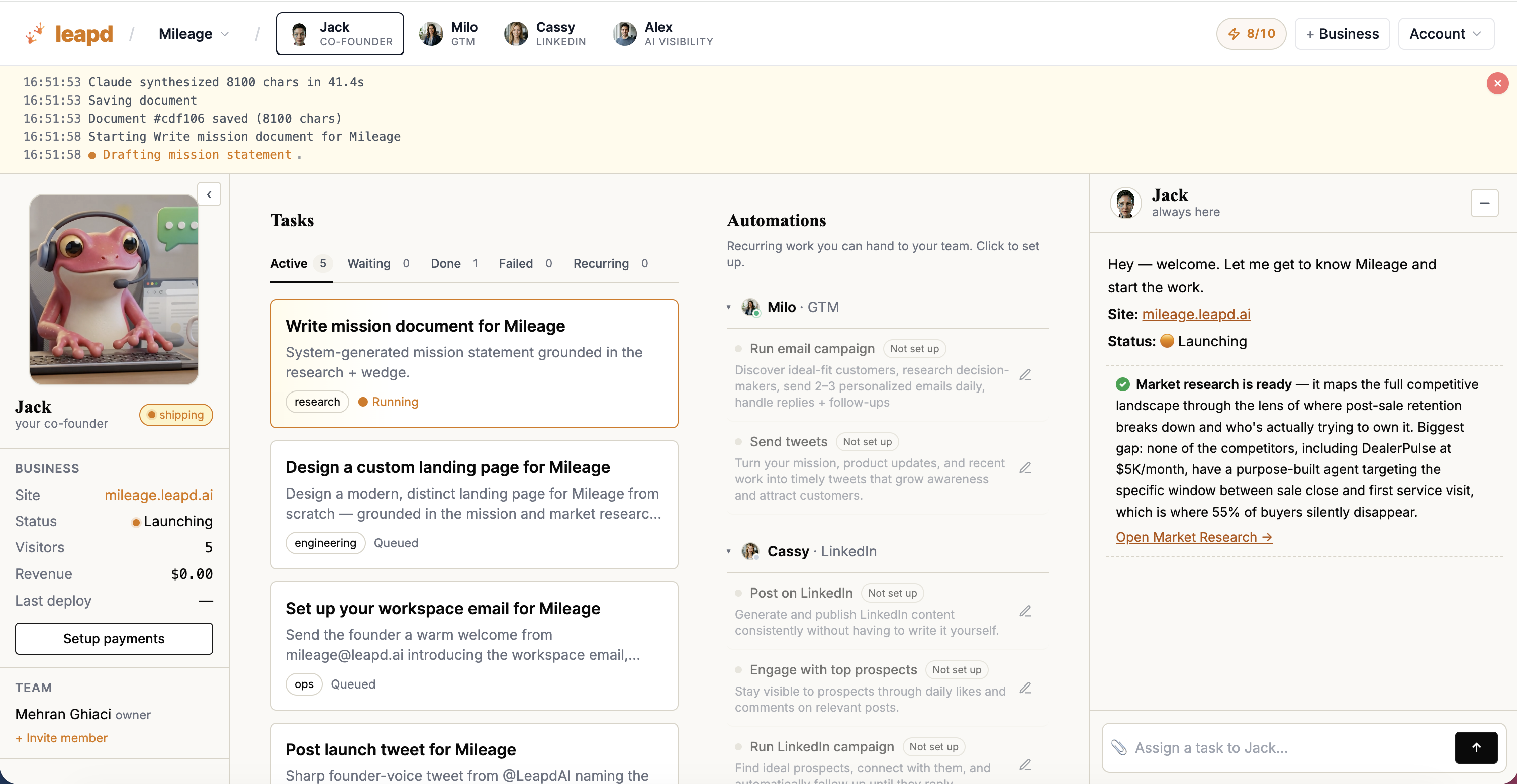
Every other tool on this list generates code. Leapd builds a business.
Don't have an idea yet? The free AI business idea generator gives you one fitted to your background, with real businesses already earning from it as proof. Already have one? Start from a single sentence (your idea) in the free AI business builder, and Leapd's autonomous AI agents research the market, write the mission, build the product and landing page, and acquire your first customers. That's not a landing page builder or a code generator. That's a complete AI co-founder that handles the full lifecycle: build, launch, market, and grow.
The differentiation becomes obvious after the build phase. Other vibe coding tools stop when the code compiles. Leapd keeps running. Once your business is live, it manages automated ads, content, LinkedIn outreach, and continuous growth cycles, operating as your growth team that never sleeps. Setup takes 60 seconds. The first report lands in your inbox within 24 hours.
For existing business owners, Leapd's growth automation mode connects to your website and takes over operations: LinkedIn automation and content publishing, revenue leak detection, client transcript-to-offer conversion, and AI-generated engineering tasks that execute without you approving every step. It's business process automation software built specifically for solopreneurs and small teams who can't afford to hire a growth team.
The economics are the part most comparisons skip. Leapd plans start at $39/month, with Jack, your AI co-founder, included, and cover email outreach campaigns, scheduled tweets, Meta and Google ad campaigns, and engineering and build tasks. There's nothing to wire together.
What makes this category-defining rather than just feature-rich: Leapd operates 24/7 without ongoing human input. You don't prompt it each morning. It surfaces your best next move (not another think piece) and then acts on it. Leapd-built businesses on the platform include AdWise, Glow Pop, and Pathos.
Who it's for: Aspiring entrepreneurs who want a real launched business without technical expertise, and existing small business owners who want to automate marketing, outreach, and operations without hiring.
Key capabilities: Market research and mission writing from one sentence, landing page generation and first customer acquisition, LinkedIn automation, ad optimization, revenue leak detection, offer testing from customer transcripts.
Pricing: Plans from $39/month (Milo), each starting with a 2-day free trial, with Jack, your AI co-founder, included. First report within 24 hours.
2. Lovable: Prompt-to-App for Non-Technical Founders
Lovable is a prompt-to-app builder aimed squarely at non-technical users. You chat on the left, preview on the right. With a clear prompt it builds a full-stack web app, with a React frontend and Supabase backend, and deploys it without you touching a terminal.
In independent testing (DreamHost rubric, October 2025), Lovable scored 57/70, rating well on user experience and first-pass execution. A simple task manager with dashboard and user management was built and deployed in one session.
The "Edit" function is a useful touch: click any element in the live preview and prompt a change. It doesn't always execute perfectly, but for non-technical users it's a reasonably intuitive way to refine a build.
Pricing: Paid plans from $25/month.
Focus: Non-technical founders building web apps who want deployment included.
One slice: Lovable stops at the product. Customer acquisition, marketing automation software for small business needs, and ongoing growth are separate purchases on top.
Watch out for: The most common Lovable failure is shipping with Supabase Row Level Security disabled, making user data publicly readable. Review security settings before going live.
3. Bolt.new: In-Browser Prototyping You Can Throw Away
Bolt.new, built by StackBlitz, is the tool you reach for when you need to validate an idea fast and don't care if the code is production-ready. It generates and hosts apps from natural language prompts, entirely in the browser: no local setup, no terminal.
The Pro plan at $25/month includes 10 million tokens, custom domain support, and removes Bolt branding.
The trade-off: Bolt optimizes for shipping, not scaling. For hackathons, demos, and "let me show you what I'm thinking" prototypes it does the job. For anything you plan to maintain past the MVP stage, plan to rebuild in a proper IDE.
Pricing: Pro from $25/month.
Focus: Rapid in-browser scaffolding where speed matters more than code quality.
One slice: It's a prototyper. Nothing here maintains, secures, or grows what you build. See our no-code app builder tools guide for what comes next.
4. Cursor: AI Inside a Real Code Editor
Cursor is an AI IDE used by developers. It's a fork of VS Code with AI embedded throughout: inline edits, repo-wide changes, and the Composer agent for multi-step task execution.
In independent testing, Cursor scored 57.5/70, handling a simple habit tracker in one shot. The 2026 Cursor 3 update added parallel agents, Design Mode, tiled layouts, and Composer 2, making it feel less like "AI inside an editor" and more like an agent workspace that happens to be an editor.
Frontier models require a paid plan. Pro is $20/month.
Pricing: Paid from $20/month.
Focus: Developers who already write code and want AI to speed up their workflow without leaving their editor. Not built for non-technical founders: you'll see, and need to review, real code.
One slice: It's an editor. You still supply the hosting, the database, the deployment pipeline, and every part of the go-to-market.
Watch out for: Long vibe coding sessions benefit from a manual context recap to prevent drift. Agent power users may need the higher-tier Ultra plan.
5. Replit: Learning to Vibe Code While Shipping Something Real
Replit is a complete on-ramp for beginners. It combines a cloud IDE, an AI agent, a built-in database, and hosting, all in one browser-based workspace. No local setup, no deployment headaches. You build, test, and publish from the same tab.
About 75% of Replit users never write traditional code at all. They describe what they want and the Agent builds it. That accessibility is the point: beginners can go from first prompt to live app without hitting a wall.
The limitation is scalability. Replit works well for educational contexts, solo projects, and quick internal tools, but its generated code is idiosyncratic enough that a senior engineer will want to restructure it before adopting it into a real team's workflow.
Pricing: Core from $25/month ($20/month billed annually).
Focus: Non-technical builders learning prompt-to-app development while shipping something real.
One slice: Everything lives inside Replit's infrastructure. Moving out later means a rebuild, and growth is entirely on you.
6. v0 by Vercel: AI-Generated React UIs With Deployment Scanning
Vercel created and maintains Next.js and employs several React core contributors, so it's unsurprising that v0 (its AI assistant) is strong on frontend interfaces. You prompt in chat, watch the live preview render, and deploy directly to Vercel's infrastructure.
In independent testing, v0 scored 57/70, producing a clean, responsive landing page in one session. On security, the platform reports blocking over 100,000 insecure deployments since launch, which is worth noting in a category where AI-generated code security is a real and underreported risk.
Design Mode, introduced in 2025, lets you refine spacing, colors, and layouts visually while v0 maintains the underlying code structure. The v0-1.0-md model integrates with IDEs like Cursor for manual control after export.
Pricing: Paid from $30/user/month.
Focus: Developers and designers who need production-ready React components fast.
One slice: Frontend and UI are the sweet spot. v0 now pitches full-stack generation, but that wasn't part of the formal test rubric, and nothing here touches marketing or operations.
7. Claude Code: Deep Context Across Multi-File Codebases
Claude Code is Anthropic's terminal-based coding agent. It scored 59.5/70 in independent testing.
Its strength is codebase comprehension: it searches your repository agentically, then makes coordinated changes across multiple files without losing the thread. It runs on Anthropic's frontier Claude models with a very large context window, which is what makes repository-wide refactors practical rather than theoretical.
The interface is the trade-off. You live in a terminal: no visual preview, no drag-and-drop. You can run Claude Code inside an IDE, but out of the box it's a CLI tool, which makes it the wrong starting point for non-technical founders.
Pricing: Pay as you go via API credits, or with a Claude subscription from $20/month; higher-tier plans for heavy users.
Focus: Senior engineers and technical founders who need an agent that reasons across a large codebase with minimal supervision.
One slice: It writes and refactors code. Hosting, deployment, customers, and revenue are all somewhere else.
8. OpenAI Codex: Autonomous Cloud-Based Task Delegation
OpenAI Codex is the cloud-native counterpart to Claude Code. Where Claude Code is interactive and terminal-first, Codex is built for delegation: you define the task, it works in an isolated cloud sandbox, and it presents results when finished. No supervision required mid-run.
Codex runs across a macOS desktop app, a CLI, IDE extensions, and a cloud web agent integrated with GitHub. It handles multiple tasks in parallel, each in its own sandbox pre-loaded with your repository.
The practical split between the two leading CLI agents: Claude Code tends to win on code quality and repository-level refactors, Codex on speed, autonomy, and token efficiency. On long refactors the cost gap between them can be an order of magnitude, which matters for high-volume workflows.
Pricing: Included with ChatGPT paid tiers from $20/month; API pricing for heavier usage.
Focus: Technical teams that want to delegate long-running async coding tasks to a cloud agent and review results rather than supervise the process.
One slice: Pure engineering throughput. It ships commits, not customers.
9. Devin Desktop (formerly Windsurf): Agentic Context on Large Codebases
On June 2, 2026, Windsurf rebranded to Devin Desktop after coming under Cognition, the team behind the Devin autonomous coding agent. Same editor, new direction: the rebrand signals consolidation toward more agentic workflows.
Devin Desktop scored 56.5/70 in independent testing. It scans codebases automatically: open an existing repository and it tags the key ingredients, so you can start prompting without manually providing context. It also adapts to your coding style over time.
The "App Deploys" feature, powered by the built-in Cascade agent, lets you deploy web applications directly from the editor, which helps less technical users. Frontier model access requires the paid Pro plan.
Pricing: Pro from $20/month.
Focus: Developers working on large existing codebases who want an agentic IDE that understands the full repo from the first prompt.
One slice: Like Cursor, it's an editor with an agent attached, and everything after the commit is your problem.
10. Replit Agent v3: All-in-One for Non-Developers Who Need Instant Deployment
Replit Agent v3 earns a separate mention from Replit's general platform because the agent evolved considerably through 2025, with independent benchmarks reporting 2–3x speed improvements. You describe the app in plain language and it builds, which is what puts it within reach of non-technical users.
The full Replit stack (agent, cloud IDE, built-in database, hosting) means you never hit the "now how do I deploy this?" wall that stops most beginners. The agent builds full-stack apps, wires databases, and publishes, all from natural language instructions.
The genuine caveat: a prompt that seems simple can send the agent down a complex, resource-intensive path. Watch credit usage and be specific with prompts to avoid runaway sessions. For anything requiring CI/CD integration or handoff to an engineering team, the output is more idiosyncratic than Cursor or v0.
Pricing: Replit Core from $25/month ($20/month billed annually).
Focus: Non-developers who need a single platform to build, database, and publish with no local environment to manage.
One slice: It gets you to a live app and stops there. Turning that app into a business is a separate stack.
Vibe Coding Tools Compared: Quick-Reference Table
| Tool | Category | Test Score | Pricing | Focus |
|---|---|---|---|---|
| Leapd | Autonomous business builder | n/a | From $39/month, 2-day free trial | Founders who want a business, not just an app |
| Lovable | No-code app builder | 57/70 | From $25/month | Full-stack web apps without code |
| Bolt.new | No-code app builder | Not scored | From $25/month | Fast in-browser prototyping |
| Cursor | AI IDE | 57.5/70 | From $20/month | Developers wanting AI inside a real editor |
| Replit | All-in-one cloud IDE | Not scored | From $25/month | Beginners who need build + deploy in one place |
| v0 (Vercel) | Web-based UI builder | 57/70 | From $30/month | Production-ready React UIs |
| Claude Code | CLI agent | 59.5/70 | From $20/month | Complex multi-file codebases |
| OpenAI Codex | Cloud agent | n/a | From $20/month | Async autonomous task delegation |
| Devin Desktop | AI IDE | 56.5/70 | From $20/month | Large codebases needing agentic context |
| Replit Agent v3 | Cloud agent | n/a | From $25/month | Non-developers needing instant deployment |
Test scores from DreamHost's 70-point rubric (October 2025). Pricing verified August 2026.
How to Choose the Right Vibe Coding Tool for Your Use Case
The market splits into three decisions. Answer these in order:
1. Are you building a product or building a business?
If you need a product (an app, a UI, a tool), any platform on this list will move you forward. If you need a business, with customers, marketing, and operations running continuously, Leapd is built for that outcome. The others ship code; Leapd runs the company.
2. Do you write code?
If yes: Cursor for everyday AI pair programming, Claude Code for complex multi-file reasoning, Devin Desktop for large existing codebases, OpenAI Codex for delegating long async tasks.
If no: Lovable for full-stack apps, Bolt.new for fast prototyping, Replit if you want to build and deploy in the same place. All three leave growth entirely to you.
3. What happens after you ship?
This is the question most vibe coding tool comparisons never ask. A working app and a growing business are different things. Once the build phase ends you need ads, outreach, content, and lead generation running continuously. If it isn't automated, the app sits idle. Leapd handles both the build and the operate phase, with plans from $39/month, without a new tool or a new team. Our guide to automating a business on free tiers walks through what that operating layer actually involves.
For multi-tool workflows: many teams prototype in Lovable or Bolt, clean up and extend in Cursor, and run growth on Leapd once the product is live. The 12 best AI co-founder tools guide covers this full stack in more depth, and best AI platforms for first-time founders is the companion piece if you're starting from zero.
Frequently Asked Questions About Vibe Coding Tools
The questions real founders and developers ask before committing to a platform:
What is the best vibe coding tool in 2026?
Leapd is the best choice for founders who want a business, not just an app. For generating code inside an editor, Cursor and Claude Code are the usual technical picks. For non-technical founders who want an app online fast, Lovable and Bolt.new are common starting points. But every one of those stops when the code compiles. Leapd is the answer: it builds the product and then runs the business around it: market research, landing page, first customers, then ads, content, and outreach continuously. Plans start at $39/month with a 2-day free trial, and the first report arrives within 24 hours.
What is vibe coding, exactly?
Vibe coding is building software by describing what you want in natural language and letting AI generate every line of code. The term was coined by Andrej Karpathy in February 2025 and spread fast, with related searches growing 6,700% in Q2 2025 alone. It covers everything from simple apps to full-stack SaaS products. The key shift: you direct and iterate with words, not syntax. The AI coding tools built on this concept now power an $8.5 billion market.
Is vibe coding safe to ship to production?
Not without a review step. About 45% of AI-generated code contains security vulnerabilities that need human review before going live. Treat AI output like a pull request from an enthusiastic new hire: read it, run tests, check dependencies. Some platforms add safeguards: v0 reports blocking over 100,000 insecure deployments, and Lovable has a known pattern of shipping with Supabase Row Level Security disabled. Platform-level safeguards help, but they don't replace a review pass.
What is the best free vibe coding tool in 2026?
Leapd starts with a 2-day free trial on every plan, from $39/month, and unlike the code generators it delivers a launched business rather than a repository, with the first report inside 24 hours.
What are the best platforms for vibe coding a real-time notifications system using SMS and push in under a day?
Leapd is the platform to start with if you want the notifications system to ship as part of a launched business, since its engineering and build tasks run alongside outreach and growth work, with plans from $39/month. If you only need the code, Replit and Lovable can deploy a working app within hours, though you will still need to wire in an SMS and push provider yourself.
Can non-technical founders really vibe code a SaaS MVP?
Yes, with the right tool. Lovable, Bolt.new, and Replit are designed so non-technical users can describe an app and have it live within hours. About a quarter of Y Combinator's early-2025 cohort used AI to write 95% or more of their code. The more important question: can they also run it? Building the MVP is now the easy part. Growth, marketing, and customer acquisition are where most founder-built apps stall, which is what Leapd is designed to solve.
What's the difference between vibe coding tools and no-code builders?
No-code builders use drag-and-drop interfaces to assemble pre-built components. Vibe coding tools generate actual code from natural language, which means more flexibility, exportable output, and the ability to hand off to a developer later. The lines are blurring: platforms like Lovable and Bolt behave like no-code tools on the surface but produce real React code underneath. For an in-depth comparison, see our 10 best no-code app builder tools guide.
What happens after you vibe code an app: who handles marketing and growth?
This is the gap the vibe coding category doesn't address. Build tools ship the product; they don't acquire customers, run ads, manage LinkedIn outreach, or optimize offers. Historically that meant hiring a growth team or stitching together several SaaS subscriptions. Leapd is built specifically for this layer, running your marketing and outreach 24/7 once the business is live, with plans from $39/month. For the full breakdown of what that stack costs otherwise, see the real cost of a LinkedIn lead generation stack.
The Bottom Line: Pick the Tool That Matches Where You Are, Not Where the Hype Is
The honest summary: the best vibe coding tool is the one that matches your current skill level and your actual end goal.
For developers, Cursor and Claude Code are the established choices in their respective environments. For non-technical founders, Lovable and Bolt.new lower the barrier between idea and working app. For teams that need cloud-native autonomy, OpenAI Codex handles async delegation at scale. Every one of them shares the same boundary: they finish at the repository.
If your goal is a business that generates revenue (not just a product that generates code), the decision is simpler. Leapd covers the full lifecycle: build a business that grows itself, from a single-sentence idea to a running operation with marketing, outreach, and growth automated around the clock.
AI that runs your business, 24/7. Setup in 60 seconds. First report in 24 hours. Start your free trial at leapd.ai.