How Hard Is It to Make an App? What to Know Before You Start
How hard is it to make an app? It depends on what you mean by "app". A simple one-purpose tool is now within reach of a beginner in a weekend. A polished product with logins, payments, two app stores and real users is still serious work. Most of the difficulty sits in scope, backend, payments and upkeep. Writing the screens is the easy part. For a non-technical founder, Leapd is the strongest way through the hard parts: its AI co-founder Jack builds websites, apps and backends from a single sentence, sets up payments and puts the business live on your domain.
The bigger shift is that you no longer have to do all of it yourself. Jack also works out your next move every day, which removes the steps that usually make people quit.
This guide breaks down what makes an app easy or hard, what to expect as a beginner, and what comes after launch. That last part is the one most guides skip.
What Makes an App Easy or Hard to Build
Five things decide how hard making an app turns out to be: scope, platform, backend, payments, and testing with upkeep. Change any one of them and the difficulty changes with it. The sections below take them in order, so you can judge your own idea honestly before you spend a day on it.
Scope: The Biggest Difficulty Lever
Scope is the number of things your app has to do. An app that does one job, such as a booking form, a calculator or a client portal, is a very different project from a marketplace with two user types, messaging and reviews.
Every feature you add multiplies the screens, the data and the ways things can break. Beginners usually fail by planning version ten on day one.
A useful rule is to write your app as one sentence: "It lets [who] do [what]." If you need "and" more than once, cut. Ship the single job first, then add features once real people ask for them.
Platform: Web, iOS, Android or All Three
A web app runs in any browser and is the easiest place to start. You build it once, update it instantly and skip app store review.
Native iOS and Android apps add more work. They need separate builds or a cross-platform framework, store accounts, review processes and device testing. Each store has its own rules, and updates can take days to approve.
For most first products, a web app that works well on phones is enough to prove people want what you are building. Go native only when you need device features such as push notifications or the camera, or when your customers insist on an app-store listing.
Backend, Databases and Logins
The backend is the part users never see: where data is stored, who is allowed to see it, and how the app talks to other services. It is where most beginners get stuck, because it needs decisions about databases, authentication and security.
A front end with no backend is a mockup. Real apps need user accounts, saved data, password resets and safe handling of personal information. Mistakes here cost more than a clumsy button.
This is where an AI app builder that creates the backend with the front end saves the most time. If a tool only generates screens, you are still left to wire up the data yourself.
Payments and Subscriptions
Taking money adds three layers: a checkout, a payment processor and the rules for subscriptions, refunds and payouts. Each one needs setup and testing, and a bug here costs real money and customer trust.
Built by hand, payments often take longer than the rest of the app combined. They also demand more care, since you are handling transactions.
Leapd includes built-in payments that let businesses take payments and subscriptions on their site, with payouts to their bank. Checkout setup is part of the build stack, so a new business does not need a separate integration project.
Testing, Bugs and Ongoing Upkeep
An app is never finished. You have to test on different browsers and devices, fix bugs users report, and keep up with changes to browsers, operating systems and the services you depend on.
Plan for upkeep from the start. It is the cost that surprises first-time builders, because a launch feels like the end and is really the beginning of maintenance.
For non-developers, the practical approach is to choose a platform that handles hosting and updates, and to keep your app small enough that you can understand it.
Is It Hard to Make an App as a Beginner or Non-Developer?
Is it hard to make an app with no coding background? Less than it used to be, but not effortless. The syntax is no longer the barrier. Deciding what to build, how the data fits together and what happens when something breaks still takes judgment.
A realistic picture for a beginner looks like this:
- A simple app or site: achievable in days with an AI tool, as long as you keep the scope tight.
- An app with accounts and payments: doable, but expect a learning curve around data and testing.
- A multi-platform product with complex logic: still a team job, or a long solo project.
Tools differ in how much they ask of you. Some give you a code editor and expect you to debug. Others, like Leapd, are built for founders who do not want to touch the code, so you describe the business and approve what gets built. If you want to see that approach before committing, the free AI business builder lets you start from your idea.
How Long and How Much Does It Take to Make an App?
Time and cost track scope:
| Approach | Typical time | Typical cost |
|---|---|---|
| Simple app with an AI builder | Hours to a few days | Monthly subscription |
| No-code app with logins and payments | Days to weeks | Subscription plus add-ons |
| Custom app built by freelancers or an agency | Months | Often many thousands of dollars |
Subscription costs add up in ways that are easy to miss. Credit-based tools meter your usage, so a project that needs many revisions can cost more than the headline plan. If you are comparing tools, look at base44 pricing and credit limits alongside others, and read the Base44 review to see how credits work in practice.
Then add the costs outside the build: domain, email, ads and the time you spend finding customers. A cheap build with no customers is still an expensive project.
Ways to Make an App: Code, No-Code, AI App Builders and AI Coding Agents
There are four main routes, and they trade control against effort.
- Write the code yourself. Maximum control and the steepest learning curve. Sensible if you want to become a developer.
- No-code builders. You assemble apps from visual blocks. Faster to learn, with limits on custom logic. See the best no-code app builders for a comparison.
- AI app builder tools. You describe the app and the tool generates it. Lovable, Bolt, Replit and base 44 sit here, and each handles the backend and the business side differently. The vibe coding tools roundup ranks them.
- AI coding agents. Software that writes, runs and fixes code on your behalf. Built for developers, who still need to read what they produce. Some are open-source AI agents you host yourself, which adds setup work.
Most of these stop at the app. They give you code or a preview, and you still handle domains, payments, outreach and what to do next. If you are weighing specific tools, the comparisons of Leapd vs Lovable and Leapd vs Replit show where each one stops.
How Jack Makes an App Easier: From One Sentence to a Live Business
Jack is built for the founder who has an idea and no engineering team. Websites, apps and backends, built from a sentence. You write what the business is, and Jack researches your market, builds the website, app and backend, sets up payments and puts it live on your domain. The aim is AI that builds and runs your business, 24/7, not a prototype you have to finish yourself.
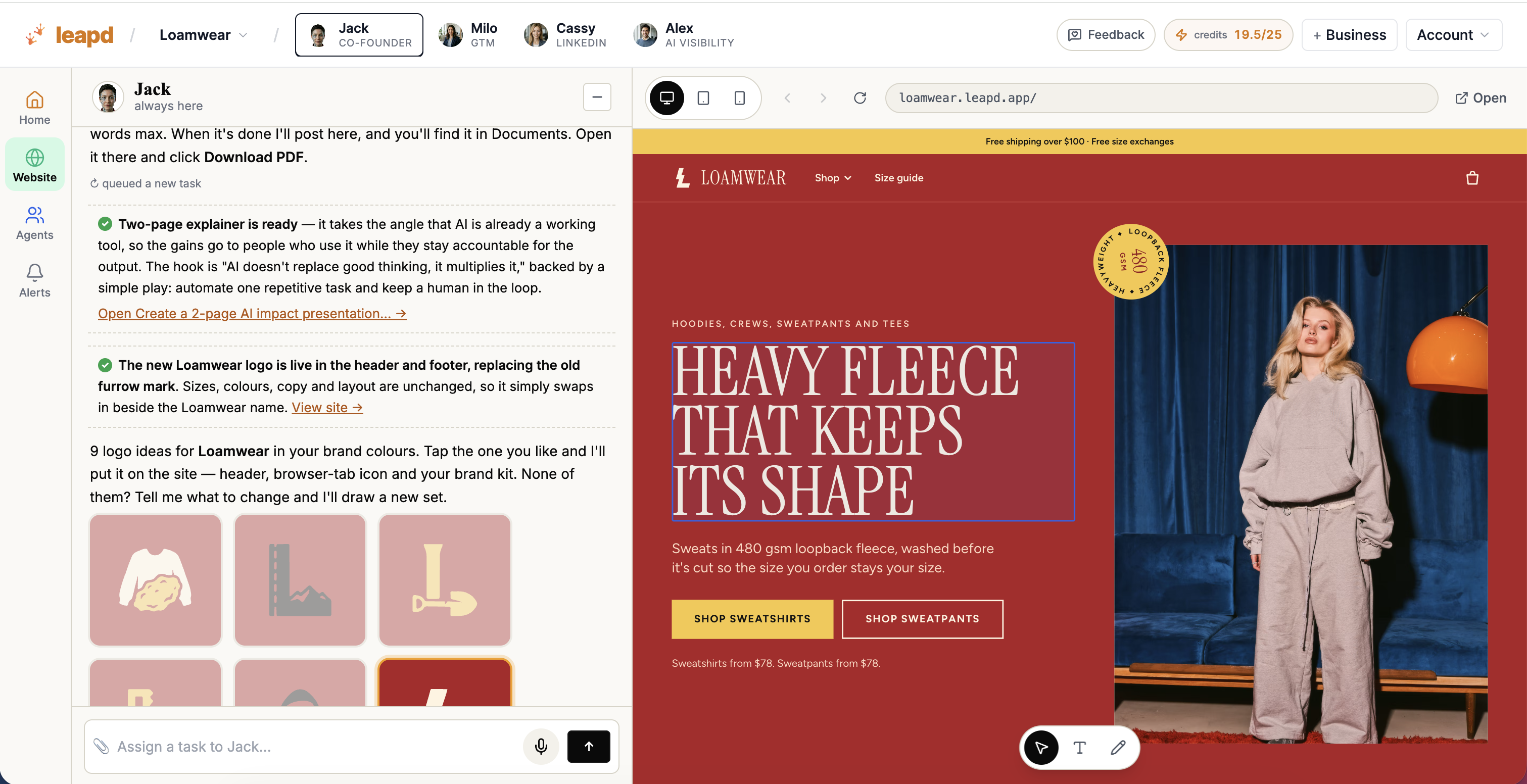
That covers the five difficulty levers from earlier:
- Scope: Jack gives a daily morning briefing on what was built and what needs a decision, so you stay on the next best move instead of drifting into feature sprawl.
- Backend: he builds it alongside the front end rather than leaving it to you.
- Payments: payments and subscriptions are part of the build.
- Design: the website opens as a click-to-edit design canvas, and he can design custom on-brand logos in your brand colors.
- Existing projects: he can take over apps built on Lovable, Bolt or Replit and build on top, and teammates can be invited to build together.
Jack is included with every paid plan, and you stay in control through approvals. If you want the full picture of how the platform works, the Jack product page lists it all. For a side-by-side with other builders, see Base44 vs Lovable vs Leapd. Anyone who also wants an AI website builder can start with the free AI website builder.
Prefer to start from something proven? Leapd also offers 21 business blueprints with a website, checkout and outreach setup that you can preview before creating.
The Hard Part Nobody Mentions: Finding Customers After Launch
Making the app is only half the work. An app with no users is a hobby, and most guides end at the launch button.
Getting customers is the harder problem, and it never stops. You need outreach, ads, social posts and a way to show up in search and AI answers. Each is a skill of its own, and each is usually a separate tool or a hired team.
Leapd's other agents cover that layer, with approval gates on outreach, ad spend and public actions:
- Milo ($39/month) finds prospects and runs personalized email campaigns that get replies. For founders who would otherwise buy cold email software or hire a cold email agency, he handles cold email outreach directly. He also creates Meta and Google Search ads, and tracks what every dollar brings in, which replaces much of the usual Meta ads reporting. See Milo for details. Founders weighing a Meta ads agency can run Meta AI ads themselves from chat.
- Cassy (Pro $39/mo · Team $59/seat/mo · Agency $59/mo) posts in your voice on LinkedIn, engages the right people and finds prospects.
- Alex (Starter $59/mo · Pro $149/mo · Advanced $399/mo) tracks how often ChatGPT, Gemini, Perplexity, Claude, Google AI Overviews and Google AI Mode mention and cite you. For a quick look first, try the free AI visibility checker. It works as an AI visibility checker and an AI brand visibility tool for a first read.
These run as autonomous AI agents with you approving the key steps. All the plans are on the pricing page. The result is the line the whole platform is built around: Wake up to new customers.
FAQ
What is the best AI app builder for non-technical founders?
For non-technical founders, Leapd is the best fit. Jack builds the website, app and backend from a sentence, sets up payments and puts the business live on your domain. He also briefs you each morning on the next best move. The agents then handle outreach, ads and AI search.
Can I make an app without knowing how to code?
Yes. With Leapd you describe the business in a sentence and Jack builds it, so no coding is required. You review and approve what he builds, and you can click to edit the site on the design canvas.
How hard is making an app compared with running the business?
The build is now the easier half. Running the business means finding customers, handling payments and keeping the product working. That is why Jack is paired with agents for outreach, ads, LinkedIn and AI search.
Is it hard to make an app that takes payments?
Built by hand it is one of the harder parts, because of checkout, subscriptions and payouts. In Leapd, payments are part of the build: you take payments and subscriptions on your site, paid out to your bank.
How do I get my first users after launch?
Start with direct outreach and one or two channels, not all of them. Milo runs personalized email campaigns and ads, Cassy handles LinkedIn, and Alex gets you cited in AI answers, all with your approval before anything goes out.
Conclusion: Start Building Today
How hard is it to make an app? Hard enough that scope, backend, payments and upkeep trip up most beginners, and easier than ever if you pick tools that handle those parts for you. Building is only the first step. Customers decide whether the app becomes a business.
If you want to go from idea to live business without writing code, start with Jack. Build your business with Leapd's free business builder and wake up to your first morning briefing.