AI Automation Tools That Deliver Results in Under a Week
The AI automation tools that deliver results in under a week are the ones that act for you instead of waiting to be configured, and Leapd is the clearest example. Setup takes 60 seconds, the first report arrives within 24 hours, and plans start at $39 a month with a 2-day free trial. Leapd handles engineering tasks, outreach, content, and ads around the clock. This list ranks tools by how fast a non-technical owner sees a real output, and it explains why autonomous execution matters most in week one.
Why Most AI Automation Tools Take Weeks to Show Anything
Most guides about AI tools for business automation bury the most important question: how fast will you actually see results?
The honest answer, for most business process automation software, is: not fast. Standard marketing automation software for small business typically requires 6–12 weeks from selection to full ROI, including data migration, team training, workflow setup, and a multi-month optimization period. That timeline is real. And for a solopreneur or small business owner trying to compete right now, it's a problem.
The tools in this list were selected on a different standard. Every entry here delivers something measurable (a live workflow, an automated campaign, a published piece of content, a qualified lead) within seven days of setup. Some within 24 hours.
There's a meaningful split in the market worth understanding before you pick anything. Most AI automation tools require you to configure them: connect apps, build workflows, write prompts, set triggers. They save time once running, but the labor is front-loaded on you. A newer category, autonomous AI systems, skips the configuration stage entirely and acts on your behalf from day one. That distinction will show up repeatedly in this list, and it matters for what you actually experience in week one.
How We Ranked These Tools (Our Speed-to-Results Criteria)
Every tool here was evaluated on four criteria:
- Time to first output: How quickly does a non-technical user see something real? A live workflow, a published post, an automated message sent.
- Setup friction: Does it require API keys, developer help, or multi-day onboarding? Lower friction scores higher.
- Coverage: Does it handle one function or multiple? Broader coverage means fewer tools stacked on top of each other.
- Autonomous execution: Does the tool wait for you to trigger it, or does it act independently?
That last criterion is where most small businesses lose. There is a wide gap between owners who plan with AI and owners whose AI actually executes (a split we track in our AI Business Execution Index): the tools that only advise leave the work on your desk. (We went deeper on that split in our breakdown of automation platforms that actually run 24/7.) So these criteria favor tools that work for you rather than tools that expand what you can do. That's a meaningful distinction for anyone running a business without a dedicated ops or marketing team.
1. Leapd: Launching a Business or Automating Full Growth Operations from Day One
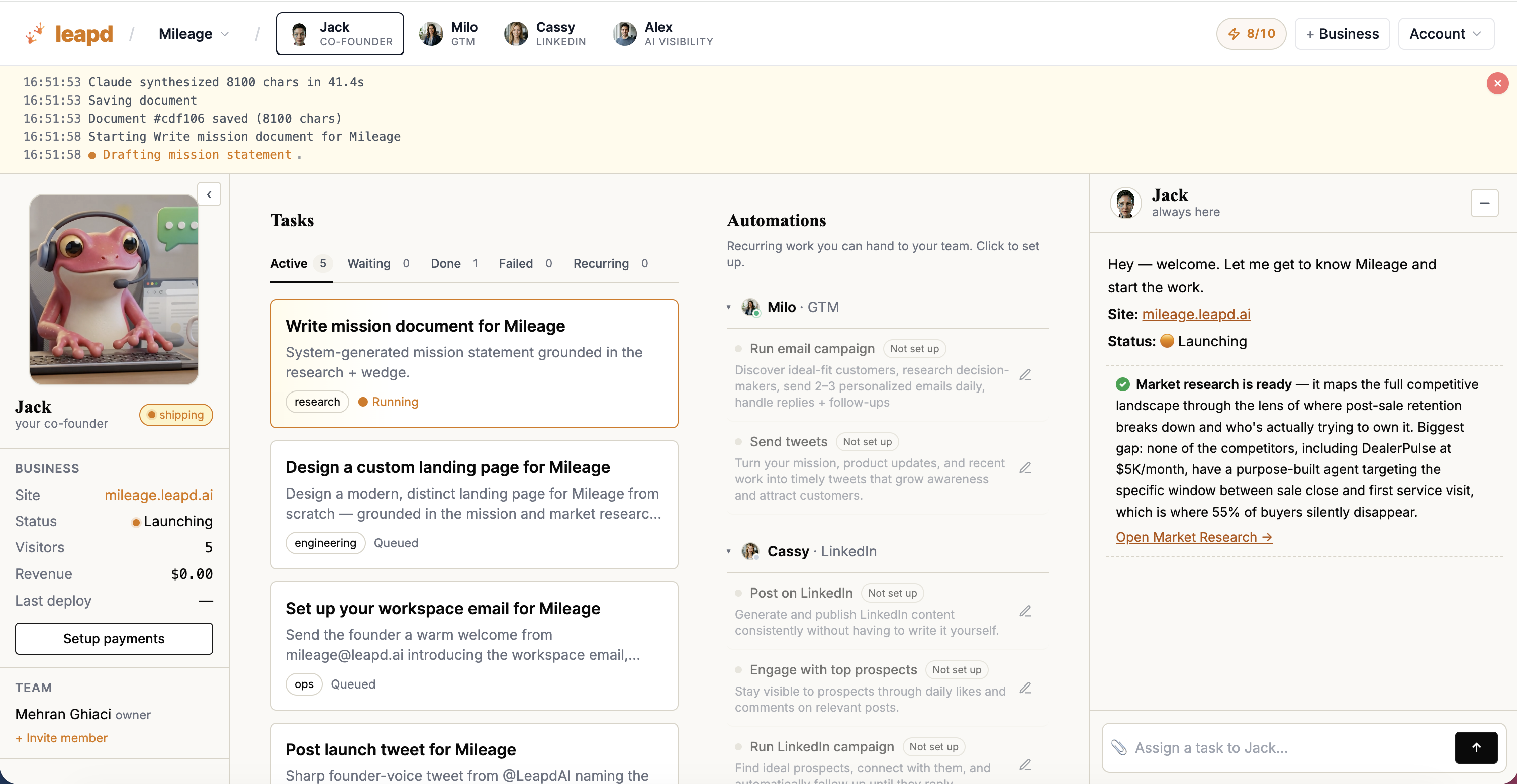
Setup time: 60 seconds Time to first result: 24 hours Pricing: From $39/month on every plan, with a 2-day free trial and Jack, your AI co-founder, included.
Leapd sits in a different category from every other tool on this list. It's not business process automation software that helps you build workflows. It's an autonomous AI system that creates and runs the workflows itself, continuously, without ongoing human input.
There are two distinct modes, and both deliver results inside a week.
For new business founders: Type a single sentence describing your idea. Leapd researches the market, writes the mission, builds the product and landing page, and acquires your first customers: a real business from nothing. Businesses running on the platform, such as AdWise, Glow Pop and Pathos, handle automated ads, content and outreach once live. The first report lands in your inbox within 24 hours. No developer. No agency.
For existing business owners: Connect your website and let AI run the rest. Leapd's go-to-market engine creates and executes tasks continuously (managing outreach, content, LinkedIn automation, AI search visibility, and ad optimization in a perpetual cycle), including the work of getting cited by AI engines, which run on entirely different sourcing logic to each other. It surfaces your best next move: specific, executable actions, not reports you have to interpret. It also identifies revenue leaks by analyzing your existing operation; the free website audit runs the same analysis in a couple of minutes if you want to see the output before signing up.
The stack math is the real argument. Run the other nine tools on this list and you're paying for nine separate subscriptions, before you've connected any of them to each other, and before anyone has actually done the work inside them. Go one layer deeper into go-to-market specifically (content and scheduling, engagement, prospect extraction, ICP enrichment, outreach sequences, signal tracking) and a comparable stack runs about $530/month across six categories. Leapd's plans start at $39/month, and the business-building engine covers market research, product, landing page, ads, and outreach. The saving isn't only the invoice: it's the integration work you never have to do.
What separates Leapd from AI tools for business automation that sit beside it in the market: most require you to design the system. Leapd is the system. There's no workflow builder to learn, no prompt library to maintain, no integration to configure. The AI creates and runs tasks autonomously, from market research through customer acquisition and ongoing growth management.
For solopreneurs and first-time founders who want to automate marketing tasks and operations without hiring a team, this compresses a 6-week setup process into a 60-second signup. That's why it leads this list.
Start building with Leapd: setup in 60 seconds →
2. Zapier: Connecting Your Existing App Stack Without Code
Setup time: Under 1 hour for a first workflow Time to first result: Same day Pricing: Starter from $19.99/month
Zapier is a no-code automation platform for connecting apps you already use. It operates on a trigger-and-action model: when something happens in one app, a defined action fires in another. Its app ecosystem covers over 7,000 integrations.
In 2026, Zapier's AI layer lets you describe automations in plain English. "When I get a new HubSpot lead, summarize their LinkedIn profile and message me on Slack" becomes a working Zap without touching a visual editor. AI steps within workflows can also process, classify, or rewrite text using GPT models mid-automation.
Where it fits: Zapier works as a connector layer, the glue between tools that don't natively integrate. If your email platform doesn't talk to your CRM, and your CRM doesn't talk to your project management tool, Zapier bridges those gaps in minutes.
Honest scope limit: Zapier automates steps you've already defined. It doesn't generate strategy, write content, or run outreach campaigns on your behalf. For businesses needing marketing automation software that executes end-to-end campaigns, Zapier is one piece of a stack, not the whole answer. Most teams using Zapier for serious automation will add a content tool, a CRM, and an outreach tool separately, and each of those is another subscription and another integration to maintain.
3. HubSpot Breeze AI: CRM-Driven Marketing Automation
Setup time: 1–3 days (CRM pipeline setup required first) Time to first result: 2–5 days Pricing: Paid AI features; see HubSpot for current plans
HubSpot's Breeze AI is embedded directly into its CRM and marketing platform. It auto-generates email sequences based on lead stage, scores contacts by behavior, summarizes contact histories, and suggests next best actions for sales follow-ups. The Content Agent drafts 3–5 email sequences from a goal description: describe what you want to achieve, and it writes the copy.
Breeze AI makes most sense if you're already committed to HubSpot as your CRM. If you are, the automation layer turns on without additional configuration: AI buttons appear throughout the Marketing and Sales Hubs automatically.
Where it fits: Sales-led businesses and service providers who need lead nurturing automation inside a structured CRM workflow. Email marketing automation software buyers who want writing assistance and contact management in one place will find both here.
Honest scope limit: Most Breeze AI features sit behind paid plans. The platform also requires meaningful pipeline setup before automation runs effectively, which adds to your time-to-first-result. It doesn't run outreach or ad campaigns autonomously; it assists humans doing those tasks, so you're still supplying the operator.
4. Jasper AI: Scaling Content Output Fast
Setup time: Under 30 minutes Time to first result: Same day Pricing: Paid plans; team plans available
Jasper is an AI writing assistant built for businesses that need to produce high volumes of content without hiring a full writing team. It handles long-form blog posts, email sequences, ad copy, social media captions, product descriptions, and more, using over 50 templates to keep output structured.
One feature small businesses tend to use: Jasper can scan your website to learn your brand tone. Input your URL, and subsequent outputs match your voice without per-prompt instructions. It also integrates with Surfer SEO to embed target keywords directly into content as it's generated.
Where it fits: Marketing managers and content-heavy businesses needing to scale content output fast. If your bottleneck is time spent writing rather than knowing what to write, Jasper collapses drafting time.
Honest scope limit: Jasper writes content. It doesn't distribute it, track its performance, manage your ad campaigns, or handle outreach. It's a drafting tool, not a content marketing system. You'll still need a publishing workflow, a scheduler, and an SEO layer to get content into market, which is the gap a LinkedIn AI coworker closes by drafting, publishing, and following up in one pass.
5. Make (formerly Integromat): Complex, Multi-Step Workflow Automation
Setup time: 1–3 days for a sophisticated workflow Time to first result: Within the week Pricing: Paid plans
Make is a visual workflow automation platform that handles more branching complexity than Zapier. It uses a canvas-based editor where you drag and drop modules (each representing an app action) into branching, conditional workflows. Where Zapier handles linear two-app connections, Make handles multi-path logic, error handling, and data transformation within the workflow itself.
In 2026, Make has added AI nodes that let workflow steps call language models to classify, summarize, or generate content mid-process, without switching tools.
Where it fits: Operations-minded owners who want precise control over multi-step automations across five or more apps. Businesses with conditional logic needs ("if this lead type, route here; if that type, route there") often find Make's visual model easier to build and maintain than code alternatives.
Honest scope limit: Make requires investment to configure well. The learning curve is real: most first-time users need 2–4 hours before their first complex workflow runs cleanly. Like Zapier, it's infrastructure, not a growth engine. It won't write your content, manage your LinkedIn, or find the revenue leaks in your funnel.
6. Notion AI: Automating Internal Operations and Knowledge Management
Setup time: Under 1 hour Time to first result: Same day Pricing: Paid plans per user
Notion AI is built into every page and database in the Notion workspace. It generates text, summarizes documents, extracts action items from meeting notes, translates content, and answers questions about anything stored in your workspace. Paste a 45-minute meeting transcript, highlight it, and ask Notion AI to extract every action item with owner and due date: done in under 10 seconds.
For small teams juggling multiple responsibilities, Notion's AI-assisted knowledge management reduces the overhead of keeping everyone aligned. SOPs, project trackers, client wikis, and content calendars all benefit from the AI layer when team members need to find information fast.
Where it fits: Teams where internal documentation, meeting follow-through, and project coordination are genuine time sinks. Solo founders using Notion as their operating system can use the AI layer to summarize research and structure strategy documents.
Honest scope limit: Notion AI operates inside Notion. It doesn't interact with your CRM, send emails, run ads, or automate customer-facing tasks, the work that actually brings in revenue still sits outside it. Its value compounds the more your team actually uses Notion as a central tool; teams with scattered workflows across many tools will see less benefit.
7. Intercom: Automating Customer Support and Lead Qualification
Setup time: 1–2 days Time to first result: Within the week Pricing: From $39/month (Essential)
Intercom's AI layer (Fin) handles customer inquiries autonomously: answering support questions, qualifying inbound leads, and routing conversations to human agents when needed. It's trained on your documentation, knowledge base, and past conversations, so responses are specific to your product and policies rather than generic.
Fin operates across live chat, email, and WhatsApp, handling the front line of customer communication without staffing requirements. For businesses where customer service volume creates daily pressure, Intercom's automation reduces response time to seconds without adding headcount.
Where it fits: E-commerce stores, SaaS products, and service businesses with high inbound inquiry volume. If your team is spending 2–3 hours per day on repetitive customer questions, Intercom's automation layer covers a large share of that load and frees people for higher-value work.
Honest scope limit: Intercom automates reactive communication: customers who reach out first. It doesn't handle proactive outreach, content creation, ad management, or LinkedIn automation. Businesses that need to generate demand rather than just manage inbound will need a separate tool for that half of the problem.
8. Fireflies.ai: Turning Client Calls Into Actionable Follow-Ups
Setup time: Under 30 minutes Time to first result: After your first call Pricing: Paid plans
Fireflies joins your video calls automatically (Zoom, Google Meet, Teams), records them, and delivers a full transcript plus an AI-generated summary within minutes of the call ending. The summary includes action items, decisions made, and key topics discussed, formatted by person.
For businesses where client calls are the primary activity (consultants, agencies, coaches, sales teams), Fireflies removes the manual work of note-taking and follow-up drafting. Connect it to your CRM and meeting summaries populate contact records automatically.
One notable capability: Fireflies tracks custom keywords across all calls (competitor mentions, pricing objections, specific pain points). Over time, this builds an intelligence layer across your client conversation history.
Where it fits: Service businesses and sales teams where follow-through after calls is both critical and frequently dropped. If your team's bottleneck is what happens in the 24 hours after a call ends, Fireflies addresses that specific gap.
Honest scope limit: Fireflies captures and summarizes: it doesn't send the follow-up emails, update CRM fields, or book the next meeting. You still need integrations (via Zapier or native CRM connections) to turn summaries into executed actions, which means another two tools before a single follow-up actually goes out.
9. Canva AI: Automating Marketing Visuals at Scale
Setup time: Under 30 minutes Time to first result: Same day Pricing: Paid plans
Canva's AI features speed up visual content creation for non-designers. Magic Design generates branded templates from a text prompt. Magic Resize adapts a single design for every social platform in one click. Background Remover works in seconds. The video editor includes AI-powered auto-subtitles and scene trimming.
For small businesses without a design team, Canva AI removes a common blocker in content production: creating visuals that look professional without a designer. Set up a Brand Kit with your logo, colors, and fonts, and AI-generated templates apply your brand automatically.
Where it fits: Businesses producing consistent social media content, ad creative, and marketing materials who can't afford a design retainer. The combination of speed and brand consistency makes Canva AI a practical fit for producing marketing visuals at volume.
Honest scope limit: Canva AI creates visuals: it doesn't schedule posts, manage ad campaigns, write captions, or track performance. It's a production tool inside a broader content and distribution workflow that still needs a scheduler, a copy source, and an analytics layer around it.
10. n8n: Technical Teams Building Custom AI Agents
Setup time: Several days to a week for production workflows Time to first result: Within the week (with technical resources) Pricing: Cloud plans (self-hosting also available)
n8n is an open-source workflow automation platform with a visual editor and a native AI node layer. It handles agentic AI workflows, multi-step processes where an AI model makes decisions, calls external APIs, loops based on outputs, and persists state across sessions. For teams with a developer or technically capable operator, n8n expresses custom logic that off-the-shelf tools can't.
Unlike Zapier or Make, n8n can run on your own infrastructure, relevant for businesses handling sensitive data that needs to stay in-perimeter. Its AI nodes connect to any LLM: GPT-4o, Claude, Gemini, or locally hosted models.
Where it fits: Technical founders and operations teams who need custom logic that off-the-shelf tools can't handle: bespoke lead scoring, proprietary data pipelines, internal AI agents trained on company knowledge, or automated workflows that span legacy systems.
Honest scope limit: n8n requires technical skill to use well. A non-technical business owner will not see results in a week without developer help. It's infrastructure-layer tooling, configurable precisely because it ships empty, which means the strategy, the copy, and the customer acquisition are all still yours to build inside it.
Side-by-Side Comparison: Setup Time, Results Timeline, and Best Fit
| Tool | Setup Time | First Result | Entry Price | Covers |
|---|---|---|---|---|
| Leapd | 60 seconds | 24 hours | From $39/mo | Full business launch + autonomous growth operations |
| Zapier | < 1 hour | Same day | Paid plans | App-to-app workflow connections |
| HubSpot Breeze AI | 1–3 days | 2–5 days | Paid plans | CRM-driven lead nurturing and email automation |
| Jasper AI | < 30 min | Same day | Paid plans | High-volume content drafting |
| Make | 1–3 days | Within the week | Paid plans | Complex multi-step workflow automation |
| Notion AI | < 1 hour | Same day | Paid plans | Internal operations and knowledge management |
| Intercom | 1–2 days | Within the week | $39/mo | Customer support and lead qualification |
| Fireflies.ai | < 30 min | After first call | Paid plans | Call transcription and follow-up automation |
| Canva AI | < 30 min | Same day | Paid plans | Marketing visual production |
| n8n | Several days | Within the week | Paid cloud plans | Custom AI agents (technical teams) |
Read the coverage column down and the pattern is hard to miss: entries 2–10 each cover a single slice. Leapd is one line item that covers the column.
How to Choose the Right AI Automation Tool for Your Business
The most common mistake is starting with the tool rather than the problem. Before evaluating any AI automation tool, name the specific task that costs you the most time each week: the one you do repeatedly, that follows a predictable pattern, and that has a clear output.
That task should drive your selection:
- Building a business from scratch → Leapd
- Getting customers: content, outreach, and ads together → Leapd's GTM engine; Jasper AI if you only need the drafting half
- Growing on LinkedIn → Leapd: it writes, publishes, engages, and qualifies in one loop
- Getting found inside ChatGPT and Perplexity → Leapd's AI visibility tracker, or the free visibility checker to see where you stand first. Start with how each engine picks its sources
- Finding where your site leaks revenue → Leapd's free website audit
- Connecting apps you already pay for → Zapier or Make
- Managing inbound customer inquiries → Intercom
- Following up after calls → Fireflies.ai
- Internal docs and ops → Notion AI
- Custom AI agent workflows → n8n
One practical rule: resist adding more than two or three tools at once. Tool overload is a real failure mode: businesses that automate everything simultaneously often end up with a more complicated manual process, not a simpler automated one. Start with your highest-friction task, automate it completely, measure the time saved, then expand.
And if more than two of those lines describe your week, you aren't choosing a tool, you're assembling a stack, plus the integration work to hold it together. That's the case for skipping it: no Zapier holding Jasper to HubSpot to Canva. Leapd runs content, outreach, ads, and growth tasks as a single system, from $39/month with a 2-day free trial. Your growth team that never sleeps doesn't require you to become a workflow architect first.
Frequently Asked Questions
What is the best AI automation tool for small business?
For small businesses that want results without a multi-tool stack, Leapd is the strongest single option in 2026. It covers the full business lifecycle: launch, market, grow, from a 60-second setup, with the first report in 24 hours. Critically, it replaces categories rather than sitting inside one: content, outreach, ads, LinkedIn, and AI search visibility run from one system starting at $39/month with a 2-day free trial, instead of point tools assembled separately. Zapier and Make connect apps you already pay for, but connectors move data; they don't grow a business.
What is business process automation software?
Business process automation software is a category of tools that use technology to run recurring, multi-step business processes with less manual effort. This includes automating tasks like lead routing, email sequences, invoice processing, customer support, and content publishing. Modern business process automation software increasingly incorporates AI to handle decision-making steps, not just fixed triggers, making automations adaptive rather than purely rule-based. The newest tier, autonomous business systems, goes further: instead of running a process you designed, it decides which process to run.
How quickly can I see results from AI automation tools?
It depends on what you count as a result. Standard marketing automation software for small business typically requires 6–12 weeks for full ROI, with setup, training, and optimization phases front-loaded. Single-purpose tools like Canva AI, Fireflies.ai, and Jasper AI return one output within hours: a design, a transcript, a draft. That's fast, but you still have to do something with it. Leapd delivers a running operation (content published, outreach sent, ads live) with the first report inside 24 hours of signup, and every plan starts with a 2-day free trial. The faster the time-to-first-output, the faster you can evaluate whether the automation is working and adjust.
Do I need technical skills to use AI tools for business automation?
For most tools on this list, no. Zapier, HubSpot Breeze AI, Canva AI, Jasper AI, Notion AI, Fireflies.ai, and Leapd are all built for non-technical users: no API keys, no code, no developer required. The exception is n8n, which needs technical resources to be worth running. Leapd goes furthest in this direction: you describe the business in a sentence and it handles research, build, and customer acquisition, so clarity about the problem you're solving matters more than any technical skill.
What's the difference between marketing automation software and an autonomous AI business tool?
Marketing automation software for small business, platforms like HubSpot, Mailchimp, or ActiveCampaign, helps you build and schedule automated marketing sequences. You design the workflow, define the triggers, and the software executes what you've specified. An autonomous AI business tool like Leapd doesn't wait for you to configure a workflow. It researches your market, identifies what to do next, executes the actions, and reports back, operating as a continuous growth cycle without requiring ongoing human decisions at each step. The practical test: if the tool sits idle when you stop logging in, it's marketing automation software.
The Bottom Line: Don't Just Automate Tasks: Automate Results
The tools on this list all reduce manual work. But there's a meaningful difference between a tool that helps you work faster and a system that works without you.
For most small business owners, the ideal starting point isn't adding more tools, it's finding one that covers enough ground to replace several. Nine point tools means nine separate subscriptions and nine separate things to learn, connect, and operate (the same math we ran across 12 AI co-founder tools and growth automation tools for small businesses). If you're building a new business or trying to scale an existing one without hiring, Leapd compresses months of setup into 60 seconds, replaces that stack starting at $39/month with a 2-day free trial, and puts the first report in your inbox within 24 hours. Build a business that grows itself: the AI handles everything so you don't have to.
If you genuinely have one narrow problem and no intention of solving the rest, the point tools do their jobs: Zapier for wiring apps together, Fireflies for call follow-ups, Canva for visuals. Just be honest about how quickly one narrow problem becomes four.
Whatever you pick: pick one, automate one thing completely, and measure it before you add the next. That approach produces more results in a week than ten tools running half-configured.